Spinner#
- class cherab.lhd.tools.spinner.Spinner(text: str = 'Loading...', interval: float = 0.1, frames: Iterable[str] = ['⢿', '⣻', '⣽', '⣾', '⣷', '⣯', '⣟', '⡿'], timer: bool = False, side: str = 'left')Source#
Bases:
objectImplements a context manager that spawns a child process to write spinner frames into a tty (stdout) duringcontext execution.
- Parameters:
- text
str,optional Text to show along with spinner, by default “Loading…”.
- interval
float,optional Spinners wait time, by default 0.1 sec.
- frames
Iterable[str],optional Spinner animated frames, by default
["⢿", "⣻", "⣽", "⣾", "⣷", "⣯", "⣟", "⡿"].- timerbool,
optional Prints a timer showing the elapsed time, by default False.
- side
str,optional Place spinner to the right or left end of the text string, by default “left”.
- text
Examples
In test.py,
import time
from cherab.lhd.tools import Spinner

# Use as a context manager
with Spinner():
    time.sleep(3.0)

# Context manager with text
with Spinner(text="Processing..."):
    time.sleep(3.0)

# Context manager with custom sequence
with Spinner(frames="-\|/", interval=0.05):
    time.sleep(3.0)

# As decorator
@Spinner(text="Loading...")
def foo():
    time.sleep(3.0)
foo()

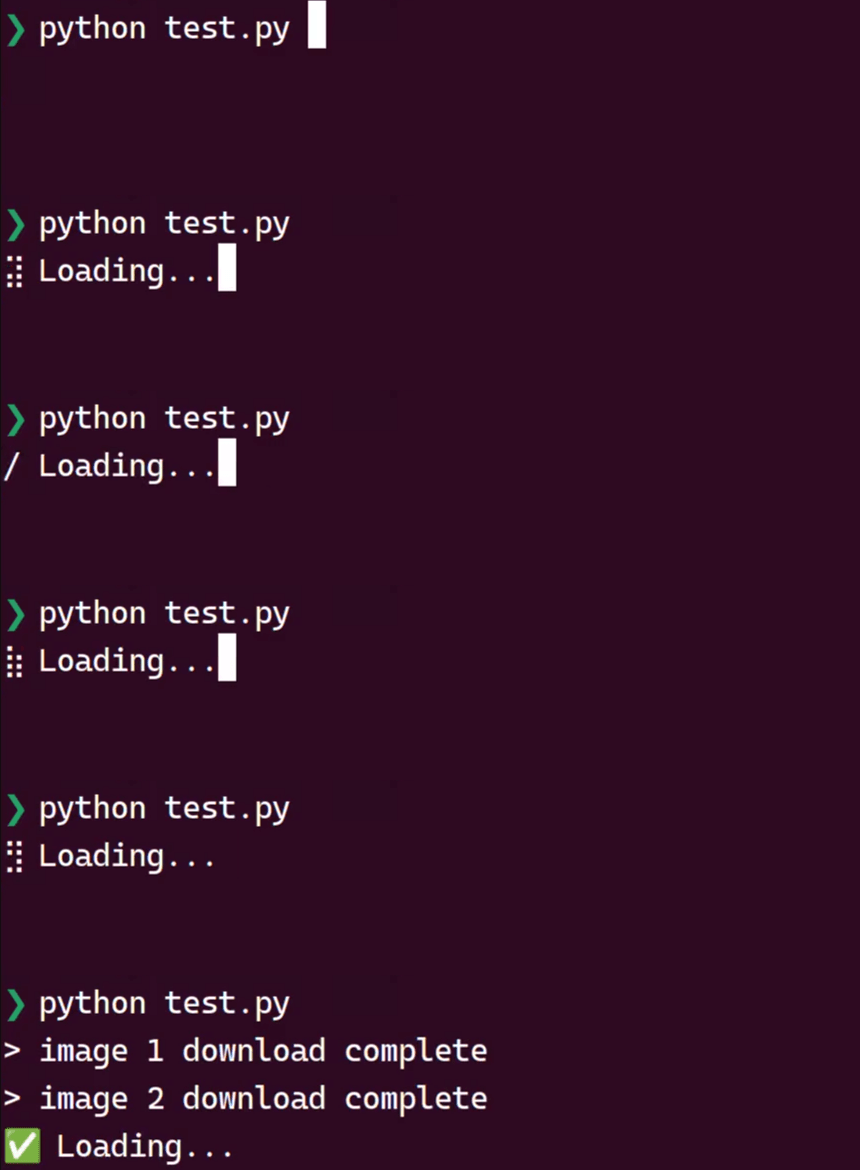
# Context manager writing message
with Spinner() as sp:
    # task 1
    time.sleep(1.0)
    sp.write("> image 1 download complete")

    # task 2
    time.sleep(2.0)
    sp.write("> image 2 download complete")

    # finalize
    time.sleep(1.0)
    sp.ok("✅")
Here is the result when the above script is executed.
Methods
__call__(fn)Call self as a function.
fail([text])Set fail finalizer to a spinner.
hidden()Hide the spinner within a block, can be nested.
hide()Hide the spinner to allow for custom writing to the terminal.
ok([text])Set Ok (success) finalizer to a spinner.
show()Show the hidden spinner.
start()Start spinner process.
stop()Stop spinner process.
write(text)Write text in the terminal without breaking the spinner.
Attributes